
Aggregate: headless, AI-ready web analytics
Web analytics that your BI tools and AI assistants can query, without identifying your visitors.
Aggregate counts what happens on your websites, not who did it. It keeps the results in your own database as stable SQL views with privacy protection built in, so Power BI, Tableau, Looker or an AI assistant can answer questions about your traffic directly. There is no analytics dashboard to learn, and the views a report or a model reads hold no visitor-level data.
- Headless. Collection, configuration and maintenance run from YAML and the command line; an optional admin UI manages the installation. Reports live in the tools you already use.
- AI-ready. Give an assistant the same read-only account as your BI tool. It sees documented, versioned views and a built-in data dictionary, never raw rows, identifiers or counts below your disclosure threshold.
- Privacy enforced, not promised. The server stores no visitor ID, IP address or exact time in anonymous mode and adds detail only with consent, and the database withholds small counts from every report, extract and query.
- Yours to run. Self-hosted from a release ZIP on ordinary PHP hosting, with MySQL, MariaDB, PostgreSQL, SQL Server or SQLite.
Beta software: contributors and early adopters are welcome. Start with a disposable installation and synthetic events. Help test installation, consent, headless administration, and database reporting through the beta testing guide. Review its known limitations before using the platform with live traffic; no independent security or privacy audit is claimed.

Aggregate's anonymous mode creates no visitor identifier. By default, an anonymous event holds a sanitized path, a coarse referrer channel, device and viewport buckets, and a UTC hour. It stores no visitor or session ID, IP address, User-Agent string, or exact event timestamp. Optional goals, coarse geography, organization markers, and explicitly allowlisted properties can add context; their values still need review for identifying detail.
Useful insight does not require a visit or session ID. Broad medium values, when explicitly allowed, can complement channels, page-path activity, event tracking and goal counts to help paint a picture of what is working. See the measurement guide for examples and current reporting boundaries, and the roadmap for planned work.
When you need more, enhanced mode adds identifiers, properties and exact dimensions — but only for visitors who have made an affirmative choice, and it stops the moment they withdraw it.
Once you start collecting data, connect Power BI, Tableau, Looker or an AI assistant to the approved reporting views.
What you get
Privacy-minimized event collection. Page views and named events, stored with sanitized paths, coarse dimensions and hour buckets. Emails, UUIDs and numeric route IDs are stripped out of paths before storage. Optional allowlisted conversion goals and continent- or country-level geography. Keep raw events private and use the thresholded reporting views for routine BI access.
Suppression in the view, not the dashboard. bi_anonymous_events_v1 and its siblings withhold the current bucket and hide any cell below your configured minimum. The threshold lives in the database and applies to every consumer of these views. Keep raw input tables private when granting a BI connection access.
Ready for AI analysis. The reporting views keep their names and column meanings across releases, and the glossary views label every code and describe every column: the context a model needs to write correct SQL instead of guessing. An assistant connected with the read-only reporting account gets the same protection as a BI user, and what reaches a model provider is released counts, not visitor records. See connect an AI assistant.
Consent that actually toggles something. setConsent(true) turns on visitor and session IDs, custom properties and exact dimensions. setConsent(false) drops the identifiers and returns to coarse rows. Wire it to your CMP and the behavior matches what the banner promised.
Optional administration UI. Operate collection, setup, and maintenance through YAML and CLI commands; set DASHBOARD_ENABLED=0 to disable dashboard/login routes. BI disclosure thresholds currently require the admin UI or controlled database administration; see configuration sources. Visualize analytics in your BI tool; the application UI manages the installation and its data contracts.
Rebrandable without a fork. Name, logo, colors and fonts are configuration. Contrast ratios are validated, so an unreadable palette gets rejected rather than shipped.
Portable infrastructure. PHP 8.2+ on PostgreSQL, MySQL, MariaDB, SQL Server or SQLite, with native and Docker deployment options. Size the host for your traffic, retention policy, and database; beta reports should include the workload tested.
A way to exclude your own team. Mark staff browsers with a configurable cookie or local storage flag and filter them out in your BI tool, without dropping the data or trusting an IP range.
Details:
- Privacy-minimized collection: page views and safe named events, with optional allowlisted goals and coarse local geography.
- Reporting views with suppression: completed hourly or daily aggregates with configurable minimum event counts.
- AI-ready reporting: versioned views and a built-in data dictionary that AI assistants can query with the same read-only account as BI tools.
- Optional page depth: a capped page count shared by events on each page, with tab storage or URL parameter passing configured through UI/YAML. See storage, URL and reporting boundaries before enabling it.
- Consent-based enhanced detail: visitor/session IDs, properties, and exact dimensions when enabled by your consent manager.
- Headless operation: an ingestion API, YAML configuration, and CLI commands, with an optional admin dashboard.
- Server-side collection: send page views and goals from your backend, with no script on the page. See the server-side guide for PHP, Java, .NET, Node.js, Python, Ruby and Go examples.
- Organization traffic markers: mark team browsers with a configurable cookie or local storage entry, defaulting to
orgInternalTraffic=true, and filter retained event JSON in BI reports. - Configurable branding and lifecycle: dashboard name, logo, colors, fonts, archiving, and retention policies.
- Database choice: PostgreSQL, MySQL, MariaDB, SQL Server, or SQLite. Enhanced ingestion uses Symfony Messenger with synchronous or asynchronous delivery.
What you give up
This matters more than the feature list, so it's up front.
No unique visitors, sessions or bounce rate in anonymous mode. Not because they haven't been built yet, but because computing them requires exactly the identifier this project refuses to create. Anonymous mode counts events. One person can contribute several of them to the same cell.
Small numbers disappear. A cell below your threshold is withheld, and widening the time window in your BI tool won't recover it. Low-traffic sites can have persistent gaps; combining periods only combines cells already released by the views.
Reports lag one bucket. The current UTC hour is never released for events; the current UTC day is never released for goals and geography. There is no real-time view.
No built-in assistant or charts. Aggregate makes the data safe and understandable to query. The BI tool, the model and the connector are yours to choose, and an assistant's access deserves the same review as any BI user's.
"Anonymous" is the name of a mode, not a legal conclusion. Rare paths, unusual event names, small populations and outside information can still make a row personal in context. Withdrawing consent is prospective — it stops future enhanced detail, it does not erase what the server already holds. The compliance guide is specific about where the line sits and what remains your responsibility.
This project suits teams that want self-hosted event measurement feeding their existing BI tools and AI assistants. It does not provide session replay, heatmaps, or a built-in marketing attribution suite.
Is this for you?
Likely yes if you answer to a privacy office or DPO, you run a public-sector, health, education or legal site, you already own a BI stack and want measurement to feed it rather than compete with it, you want to ask an AI assistant about your traffic without handing it visitor-level data, or you want to be able to explain your whole data model on one page.
Likely no if you need unique-visitor counts, funnels, session replay, heatmaps or marketing attribution. Plausible and Matomo are good software and will serve you better. This isn't trying to win that comparison.
Quick start
On a web host, from a release ZIP
No terminal is needed:
- Download
aggregate-VERSION.zipfrom the Assets of the latest release (not the Source code archives). - Upload and extract it with your hosting panel's file manager, and set the site's document root to the extracted
publicfolder. - Open the site. The setup page checks the server, asks for the one-time code in
SETUP-CODE.txt, tests your database connection and writes.env.local. Then create the administrator account.
See Release ZIP on a web host for the details and step-by-step hosting panel guides (Plesk so far). PHP 8.2+ and MySQL 8.0+, MariaDB 10.6+, PostgreSQL 13+, SQL Server 2017+ or SQLite are required.
For development
For this development setup, install PHP 8.2+, Composer, the required PHP extensions and database driver, Docker Compose, and Make. The deployment guide covers native and production installation; CONTRIBUTING.md covers development prerequisites in detail.
From a fresh checkout:
git clone --branch development https://github.com/Subschema-LLC/aggregate.git
cd aggregate
cp .env.dev .env
cp config/aggregate.yaml.example config/aggregate.yaml
composer install
make start-mysql
make migrate-mysql
The checked-in Compose setup serves http://localhost:9002. Set the active YAML environment's app_host to that URL for local integration snippets. Open /install to create a dashboard administrator, then register a website in the dashboard or through the CLI:
docker compose exec php php bin/console app:create-website
curl http://localhost:9002/api/health
Use start-postgres / migrate-postgres or start-mariadb / migrate-mariadb for another Docker profile. The sample environment is for development; use your own secrets and connection settings in production. Existing installations should follow the upgrade guidance before applying historical privacy migrations.
Admins choose an update method on the Updates page: signed release ZIPs (recommended), the repository for Git clones (advanced), or deployed another way when a hosting panel's Git deployment (such as Plesk or cPanel) or a CI/CD pipeline deploys the code. Install updates with the Install update button or php bin/console app:updates:apply; migrations and cache rebuilds run with a maintenance page in place. For code deployed another way, the page shows the deployed commit and how far behind it is, and php bin/console app:updates:deployed runs the same post-deployment steps from your tool's deployment action. updates_method and updates_branch (default master) can also be set in YAML or with app:updates:method. Your .env.local, config/aggregate.yaml, website and tag settings, config/*.local.yaml overrides and var/ data are never overwritten. See the update guide and signed release packages.
The Feature flags admin page and YAML can disable Updates or hide its navigation entries. Updates stays enabled by default. See the feature flag guide for configuration and contributor examples.
Add tracking to a website
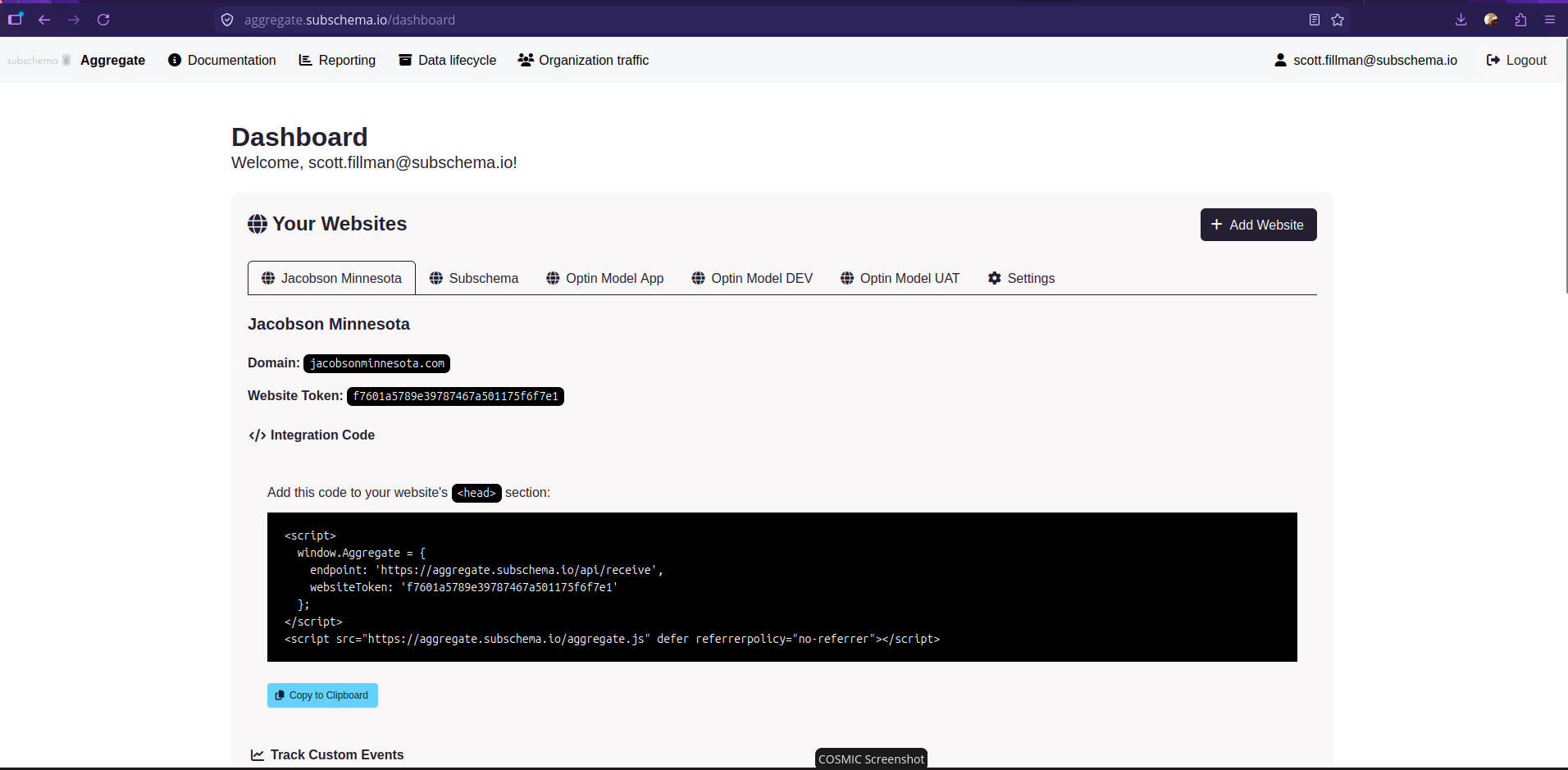
Websites and the Setup wizard generate window configuration, query-parameter, or tag-manager installation snippets. For a direct tracker installation, use the website token from your registration and your analytics host:
<script>
  window.Aggregate = {
    endpoint: 'https://analytics.example.com/api/receive',
    websiteToken: 'your-website-token',
    consent: false
  };
</script>
<script src="https://analytics.example.com/aggregate.js?min=1" defer referrerpolicy="no-referrer"></script>
The tracker sends a page view automatically. Once it has loaded, record a named event with window.Aggregate.emit('button_click'). Configure goals and review event properties before using them.
Tag-manager snippets install the container and enabled CMP. To load analytics through it, explicitly enable the manager and add the supplied tracker URL as a script action. Remove any separate tracker installation to avoid duplicate page views.
Connect your consent manager to window.Aggregate.setConsent(true) only after an affirmative choice, and call setConsent(false) for rejection or withdrawal. The tracking and GTM guide covers custom events, tag setup, consent wiring, and troubleshooting.
A dedicated Aggregate Google Tag Manager tag template is under development in a separate repository. Follow that repository for template progress and availability. The tracking guide includes GTM Custom HTML examples.
Configuration and reporting
| Setting | Source of truth |
|---|---|
| Database, transport, app secret, proxy trust | Symfony environment files or server environment variables |
| Branding, collection controls, organization markers, lifecycle, dashboard toggle | config/aggregate.yaml and supported environment overrides |
| Custom property model, UTM/query mappings, consent requirements, reporting columns | config/aggregate.yaml, managed through the Data model admin page or YAML |
| Website domains, allowed event sources, and public ingestion tokens | config/websites.yaml, managed through the dashboard, YAML, or CLI creation options |
| Per-website CMP, tags, triggers, and variables | config/tag-manager/sites/<site-id>.yaml, managed through the Tag manager admin page or YAML |
| Conversion-goal definitions | config/goals.yaml, customized in config/goals.local.yaml |
| Navigation labels and links | config/navigation.yaml, customized in config/navigation.local.yaml |
| BI disclosure thresholds | analytics_privacy_settings in the database; dashboard or controlled database administration |
For headless deployments, set dashboard_enabled: false in the active YAML environment and DASHBOARD_ENABLED=0, then clear Symfony's cache. BI thresholds remain database settings; they are not mirrored in YAML. The configuration reference explains defaults, overrides, branding, goals, organization markers, and retention.
Routine BI connections should use approved views:
| View | Reports |
|---|---|
bi_anonymous_events_v1 | Hourly page views and named events |
bi_anonymous_goals_v1 | Daily occurrences of configured goals |
bi_anonymous_geo_events_v1 | Daily coarse geography with additional suppression |
Keep raw events, archive tables, and unsuppressed operational views private. Organization markers are stored under their configured name in raw event JSON; the grouped views and archives omit that flag. Connect BI tools and AI assistants lists every column, safe query patterns, a connection checklist and how to set up an AI assistant. See the compliance guide for access and disclosure rules, organization traffic for filtering, and the database guide for connections and schema details.
The Data model page provides UTM/query mappings, configurable anonymous property whitelists, downloadable YAML, and UI/CLI regeneration of private custom reporting views. All UTMs require consent by default. Anonymous attribution should use at most a broad utm_medium; administrators can override this recommendation with the documented warning about more detailed values.
Generate and copy synthetic event examples from the saved model, or export them with php bin/console app:analytics:examples. Optional value types and separate numeric reporting columns support external calculations without changing existing text columns. The ecommerce recipe uses flat properties and integer minor units for money. Administration pages and configurable submenus keep each task focused.
Use the optional JavaScript build for minified tracker and drop-in scripts. The Setup wizard provides installation steps, button callouts, and per-website CMP/script copy or download. The optional simple tag manager stores each site's settings in YAML, serves its scripts remotely from the Aggregate installation, and maps each tag to a consent category or an explicit option to run without consent. Tags can load scripts or call an existing library method, triggered by page readiness, browser events, or data-layer events with named variable references.
Documentation
All guides are also published as a searchable site that needs no account: subschema-llc.github.io/aggregate. It is built from these files on master and describes the current release.
| Guide | Contents |
|---|---|
| Why Aggregate exists | The problem, the principles, and what the project deliberately will not do |
| Architecture tour | How an event flows from a web page to a BI report, and where to make common changes |
| Design decisions | Why the main choices were made, what they cost, and what would change them |
| Glossary | Terms used across the code, settings and documentation |
| Contributing | Branching strategy, development setup, architecture, privacy invariants, tests, Make commands, and pull requests |
| Beta testing | First test session, expected privacy/reporting behavior, known limitations, and feedback |
| Agent guide | Product ethos, architecture boundaries, privacy rules, and development expectations for coding agents |
| Roadmap | Planned work, available foundations, and current update limitations |
| Security policy | Private vulnerability reporting and disclosure guidance |
| Code of conduct | Community expectations and reporting concerns |
| Public release preparation | Maintainer reporting setup, Git history review, GitHub checks, and launch steps |
| Privacy and compliance | Measurement limits, consent, organization traffic, BI suppression, logging, retention, and operator checks |
| Configuration | YAML settings, environment overrides, branding, goals, and lifecycle policy |
| Feature flags | YAML/admin controls, navigation visibility, and developer/contributor guidance |
| Data model | UTM/query mappings, anonymous property whitelists, model sharing, and custom reporting columns |
| Event examples | UI copy/download, headless JSON exports, typed properties, and a flat ecommerce recipe |
| JavaScript build | Optional minification, dynamic tracker configuration, and build verification |
| Updating | Choosing release ZIP or repository updates, setting up a Git clone, switching methods, recovery and troubleshooting |
| Release packages | Publishing from master, signing keys, installable ZIPs, verification, and update groundwork |
| Tracking and GTM | Browser integration, custom events, tag-manager examples, and troubleshooting |
| Server-side collection | Sending events from your backend without a script, what that means for consent, and examples in seven languages |
| GTM tag template | Separate repository for the Google Tag Manager tag template, under development |
| Deployment | Docker/native setup, web servers, workers, production operations, and upgrades |
| Plesk deployment | Plesk steps for a release ZIP without SSH, Git-based setup, and worker options |
| Database | Supported engines, connection strings, migrations, and reporting schema |
| Connect BI tools and AI assistants | Approved reporting views and their columns, safe queries, a connection checklist for Power BI or Tableau, and AI assistant setup |
Contributing
Create a working branch from the latest development, using a descriptive name such as feature/add-goal-validation, issue/123-fix-consent, docs/update-setup, or chore/update-dependencies. Changes move through pull requests in this order:
- Working branch →
development: contributors submit changes for review and integration. development→uat: maintainers promote changes for user acceptance testing (UAT).uat→master: maintainers promote accepted changes for production release.
Keep contributor PRs targeted at development; uat and master receive the promotion PRs above. See the branching strategy for branch roles and PR targets, and the release guide for tagging and publishing from master.
Contributions should preserve the privacy invariants and favor simple, portable, secure, maintainable designs. Start with CONTRIBUTING.md.
You can also contribute without writing application code: try a fresh install, exercise your database engine, reproduce a reported bug with synthetic data, review keyboard access and mobile administration, or improve a confusing setup step. The roadmap lists the highest-priority work; the beta testing guide explains what makes a useful test report.
Contributions developed with AI coding agents are welcome. Bring your own expertise and judgment to the collaboration: provide project context, guide the agent's decisions, and review and test the result. Please submit changes you understand and can explain, including how they fit Aggregate's architecture and privacy goals. The contributor remains responsible for the work they submit.
Follow the code of conduct, review the roadmap before proposing substantial work, and use the security policy for private vulnerability reports.
License
The license split is:
- Browser tracker: public/aggregate.js is licensed under BSD-3-Clause, with the full text in its header and js/LICENSE.txt. This file is also the tracker source; there is no separate build source. The configured script served at
/aggregate.jscarries the same BSD license. - Code of Conduct: CODE_OF_CONDUCT.md adapts Contributor Covenant 2.1 under CC BY 4.0, with source attribution and license links in that file.
- Everything else in this project's first-party code and documentation: GNU AGPL version 3 only (AGPL-3.0-only), under LICENSE. This includes the server, dashboard, and other JavaScript; the tracker exception does not change their license.
Third-party dependencies and vendored assets retain their own licenses, including the vendored Bulma MIT notice.