
Architecture tour
Why Aggregate exists · Design decisions · Glossary · File map
A walk through how Aggregate works, for people about to change it. It follows one event from a web page to a BI report, then covers configuration, administration, browser scripts and tests. The file map in CONTRIBUTING.md lists where things live; this page explains how they fit together.
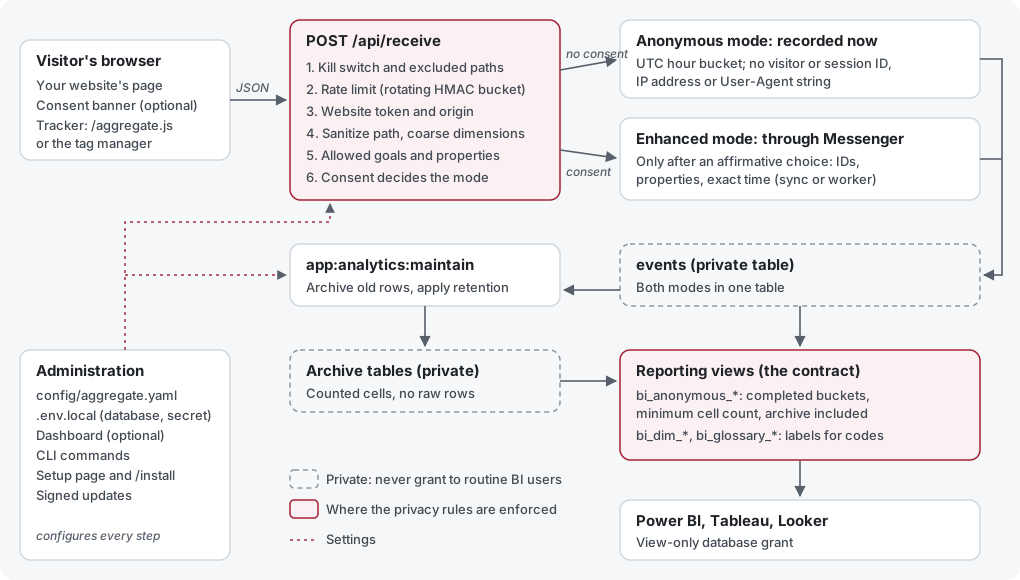
Select the diagram to open it at full size.
Aggregate is a Symfony application with Doctrine for database access. It has two halves that share one database: collection, which is public and protected by privacy rules, and reporting, which is SQL views that BI tools read. The dashboard is an optional third part for administration.
The life of an event
1. The browser sends it
A website loads the tracker, public/aggregate.js, from the installation. ScriptController serves it with the deployment's public settings: namespace, collection profile, allowed properties and the organization-traffic marker. The tracker is hand-written source with no build step; an optional minified copy is built with Terser (see JavaScript build). A consent manager, either the built-in one or the site's own, tells the tracker whether the visitor opted in.
The tracker posts a small JSON payload to /api/receive: page path, event name, coarse dimensions, and, only with consent, identifiers and properties.
2. The server checks it
ReceiveController applies the rules in this order, and stops at the first one that fails:
- Kill switch and excluded paths. If collection is off (
anonymous_tracking_enabled) or the sanitized path matches an excluded route, the event is ignored. This happens before anything else is derived from the request. - Rate limit. IpRateLimiter counts requests per client in one-minute windows. Each window's bucket name is an HMAC of the window and the address, so the file on disk cannot link the address across windows and the address is never stored.
- Website token and origin. The public token must belong to a registered website (WebsiteConfigManager), and the
Origin(orReferer) must pass that website's domain rules (WebsiteDomainPolicy). - Sanitize. PrivacySanitizer reduces the path (query strings, fragments, and identifiers such as emails, UUIDs and numeric IDs are removed), and turns the referrer, device and screen width into coarse buckets. The strict collection profile (CollectionProfile) keeps only the path, the event name and allowed goal codes, and ignores everything else, including consent.
- Goals and properties. GoalEventRegistry accepts only configured goal codes, and CustomDataSettings keeps only properties the data model allows. Anonymous events accept only those explicitly allowed without consent.
- Consent decides the mode. PrivacyPolicy treats only an affirmative choice as consent; a string such as
"false"is not consent.
Optional geography is looked up in a local MMDB file (src/Service/GeoIp) and reduced to a country or continent code. Collection makes no network calls.
3. It is recorded
- Anonymous mode (no consent): AnonymousEventRecorder writes the row immediately, with the time truncated to the UTC hour and no identifiers. Nothing more detailed than the stored row is ever written, not even briefly in a queue table.
- Enhanced mode (consent): the controller dispatches a TrackEventMessage through Symfony Messenger, and TrackEventHandler stores it with visitor and session IDs, properties and the exact time. Messenger delivers synchronously by default (
sync://); larger sites can switch to a queue and a background worker.
Both modes write to the same events table (Event), told apart by its privacy_mode column. The table is private: routine BI users never get access to it.
4. Maintenance archives and deletes it
app:analytics:maintain (AnalyticsMaintenanceRunner), run on a schedule when archiving or retention is turned on:
- Archives old rows into counted cells in private archive tables (AnalyticsArchiveService). The raw rows are then marked as archived so they are not counted twice.
- Deletes raw rows and archive cells older than the retention periods (AnalyticsRetentionService). Enhanced rows have their own, usually shorter, period.
- Holds a database lease (AnalyticsMaintenanceLease) so two runs never overlap.
Both are off by default; see archiving and retention.
5. Reporting views publish it
Migrations in migrations/ create the reporting views. The bi_anonymous_* views combine live and archived anonymous counts, release only completed hours or days, and hide any cell below the minimum count stored in analytics_privacy_settings (AnalyticsPrivacySettings). The geography view also pools small areas into "other" so that a hidden area can't easily be worked out by subtraction.
Around them:
bi_dim_*andbi_glossary_*views give BI tools labels for codes, published from declared configuration by GlossarySync (see BI labels and glossary).analytics_custom_*views project custom properties into columns. They are private, regenerated from the data model by ReportingViewManager.
A BI tool connects with a database user that can read only the approved views (see view-only grants). Every column is listed in Connect BI tools and AI assistants, and the suppression rules in the privacy guide.
Configuration
Settings have one source of truth each (listed in configuration sources):
.env.localor server variables: infrastructure, such as the database, the application secret and the message transport.config/aggregate.yaml: application settings, read by AggregateConfigLoader. Many can be overridden by an uppercase environment variable of the same name.config/websites.yamlandconfig/tag-manager/sites/: registered websites and each site's consent banner and tags.- Shipped defaults (
goals.yaml,navigation.yaml,quick_search.yaml), customized through untracked*.local.yamloverrides. - The database: BI thresholds only, an existing exception to the rule that every setting also exists in YAML.
When privacy configuration is invalid, the services fail closed: collection stops rather than guessing. The dashboard and command line write through the same services, so a setting has one validation wherever it is changed.
Administration
- Dashboard: optional.
DASHBOARD_ENABLED=0removes the login and every dashboard route (Kernel loadsroutes_dashboard.yamlonly when it is on). Pages follow the UI template conventions: Twig, Bulma, Stimulus and Turbo through AssetMapper, with no Node build. - Command line: everything an administrator needs without the dashboard, in src/Command. Examples:
app:install,app:create-website,app:user:reset-password,app:analytics:maintain,app:analytics:glossary:syncandapp:updates:apply. - First run: a fresh release ZIP starts with a browser setup page, config/setup.php and FirstRunSetup. It loads before Composer, checks the server, asks for the one-time code in
SETUP-CODE.txt, tests the database and writes.env.local. InstallController then runs migrations and creates the administrator. - Updates:
app:updates:applyand the dashboard's Install update button install signed release ZIPs or fast-forward a Git clone. A maintenance page (config/maintenance.php) answers requests while files change, and backups allow rollback. UpdatePaths lists the operator files an update never touches. See updating and signed release packages. - Feature flags: optional capabilities can be turned off for a whole deployment (feature flags).
Browser scripts
Four scripts are served to websites, each with its own delivery path and readable source:
| Script | Purpose |
|---|---|
| public/aggregate.js | The tracker (BSD-3-Clause) |
| public/consent.js | The built-in consent banner, configured per website |
| public/tag-manager.js | The lightweight tag manager, loading tags by consent category |
| micro-consent-dropins | The standalone consent banner, also usable without an installation |
Optional minified copies are generated with the pinned Terser; when they are missing or stale, the readable source is served instead.
Tests
| Suite | Covers | Runs with |
|---|---|---|
| PHPUnit (tests/) | Services, controllers, commands and SQL generation, mostly with test doubles | php bin/phpunit |
| JavaScript (tests/JavaScript) | Tracker, consent and storage behavior in Node | node --test tests/JavaScript/*.test.js |
| Release tooling (tests/Release) | Package building and signing | python3 -m unittest discover -s tests/Release |
| Fresh install (tests/Integration/fresh-install.php) | A full install, collection, archiving and every view on SQLite, MySQL, MariaDB, PostgreSQL and SQL Server | CI, or locally in a disposable copy |
Mocked SQL tests show what SQL is generated; only the fresh-install test shows that an engine accepts it. See tests and checks.
Where to make common changes
| You want to | Start here | Also update |
|---|---|---|
| Add an operator setting | The service that owns the behavior, reading it through AggregateConfigLoader | The dashboard form (optional), config/aggregate.yaml.example, CONFIGURATION.md, and tests with the dashboard off |
| Collect a new dimension | Discuss it in an issue first; it changes the privacy model | PrivacySanitizer, ReceiveController, the strict profile, the views, and the privacy guide |
| Change what a reporting view returns | A new migration that adds a new versioned view (such as _v2), keeping the old one | SQL for all five engines, the fresh-install test, DATABASE.md |
| Write engine-specific SQL | A platform branch (instanceof PostgreSQLPlatform and so on), as in the existing migrations | The fresh-install CI run on every engine |
| Add a dashboard page | templates/README.md conventions and config/navigation.yaml | A command-line or YAML equivalent for any setting it changes |
| Add a documentation page | A Markdown file, then website/pages.mjs | Links from related pages, and a DocumentationLinks topic if the dashboard should link to it; see documentation site |